A través de Hostinger se apunta el dominio aWeebly, por favor asegúrate de tener antes uncuenta activa deWeebly.
Una vez que tengas la cuenta, puedes apuntar el dominio allí de la siguiente manera:
Paso 1 – Cambiar el dominio en Weebly


Para encontrar el registro A necesario, ve aConfiguración (Settings)sección:
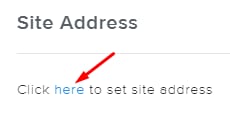
ConfigurarDirección del sitio (Site Address):
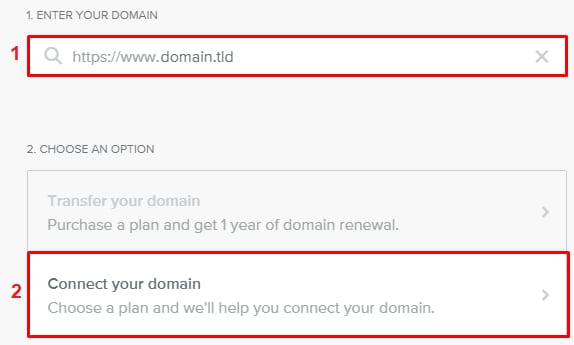
Ingresa tu dominio y haz clic enconectar o transferir ahora (connect or transfer it now):
Ingresa nuevamente tu dominio y haz clic enConectar tu dominio (Connect your domain):
Ahora, comprala suscripción preferida de Weebly. Una vez completado, recibirás el registro A necesario.
Paso 2 – Crear un registro A
Una vez que obtengas el registro A de Weebly, agrégaloa la zona DNS de tu dominio.
Después de crear el registro A,la propagación de DNScomenzará. Este proceso puede tardar hasta24 horas. Durante este tiempo, se espera que tu sitio web no funcione, pero dale algo de tiempo; pronto estará en línea.
¡Y eso es todo! Ahora sabes cómo conectar tu dominio aWeebly.
Nota
Fuente: documentación oficial de Hostinger